

Optimizing UX by reducing navigation redundancy.
TL;DR
I audited the Caparol app for usability and developed a UX optimization concept, that served as the foundation for their app re-design.

Reaching the right things was taking too long
Caparol salespeople had a hard time finding specific product details when on-site with clients.
Enable users to find what they are looking for
Rethinking the user interaction patterns led to a clean, easy usability experience.
Reworking fundamental UX to introduce usability
The work covered UX Audit, interaction design and sample wireframes.
"Caparol, while visually appealing, was lacking fundamental usability considerations."
User Insight and counting clicks
Measuring interaction path length and visualizing the information architecture, combined with user insights defined UX direction.
From status quo to the happy path
The original UX paths were long and confusing, the ideal path would see a complete overhaul of the information architecture.
.png)
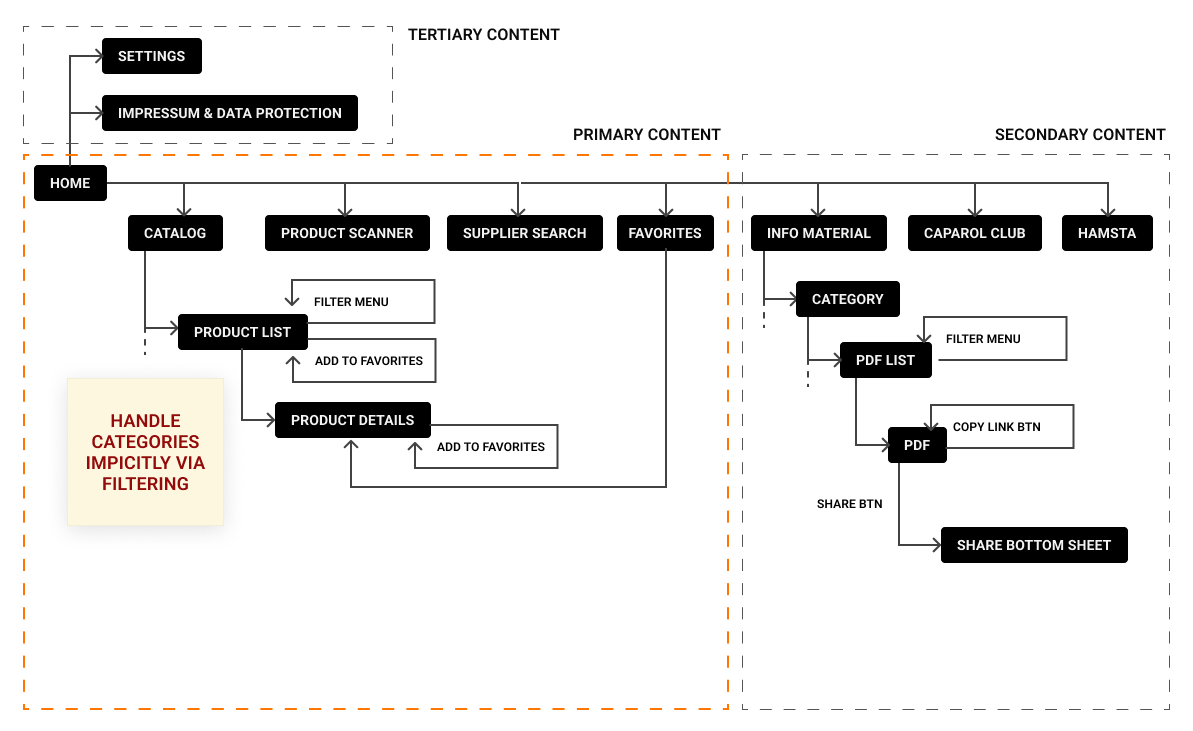
The minimum change required.
Version alpha focused on the minimum neccessary change (adding a filter mechanic), and then incrementally woring towards reaching the happy path.
.png)
Simple filter logic
The key improvement was transforming the filter logic from hard-coded traversible categories into a flexible, user-centered interaction.

.png)

What I'd carry into the next Project
The biggest impact came from adding a single fundamental usability feature, not from making the UI more pretty.
Want to see more case studies?
StackTrack
Turning fragmented data into skill visibility.
.svg)
JWT Ticket Portal
Taking support ticket creation from manual to digital
Alpaca Operator
Pulling a near-20 year old SAP System Manager into 2026

User Centered
Every product decision is made to inform, support and enable users. This is what ultimately generates revenue.

Structured
I make sure that interactions feel natural and visual hierarchy is clear. I test my ideas and base decisions in data.

Accessible
The products I create are designed with accessibility in mind. This also means my solutions are robust and scalable.
.svg)