
Turning fragmented data into skill visibility
TL;DR
I designed t centralized skill and project platform "StackTrack" that helps Public Cloud Group GmbH's managers staff projects faster while giving employees a clear way to document and validate their growth.

Fragmented data made staffing slow and growth invisible
Inconsistent management systems meant there was no reliable view of employee skills or availability. Managers spent days searching for talent, while employees struggled to receive recognition for growth and sales struggled to judge project fit.
Solve staffing and recognition together
Create one platform that connects employee skills, availability, peer feedback, and active projects instead of treating each need as a separate product.
A shared source of truth for organizational skills
The work covered research, product strategy, interaction design, prototyping, design systems, and sprint planning.
"I know we have someone with this skill. I just don't have the whole day to look for them."
Managers and employees exposed one connected problem
Conversations across management and non-management roles revealed how fragmented systems harmed both staffing speed and employee growth.
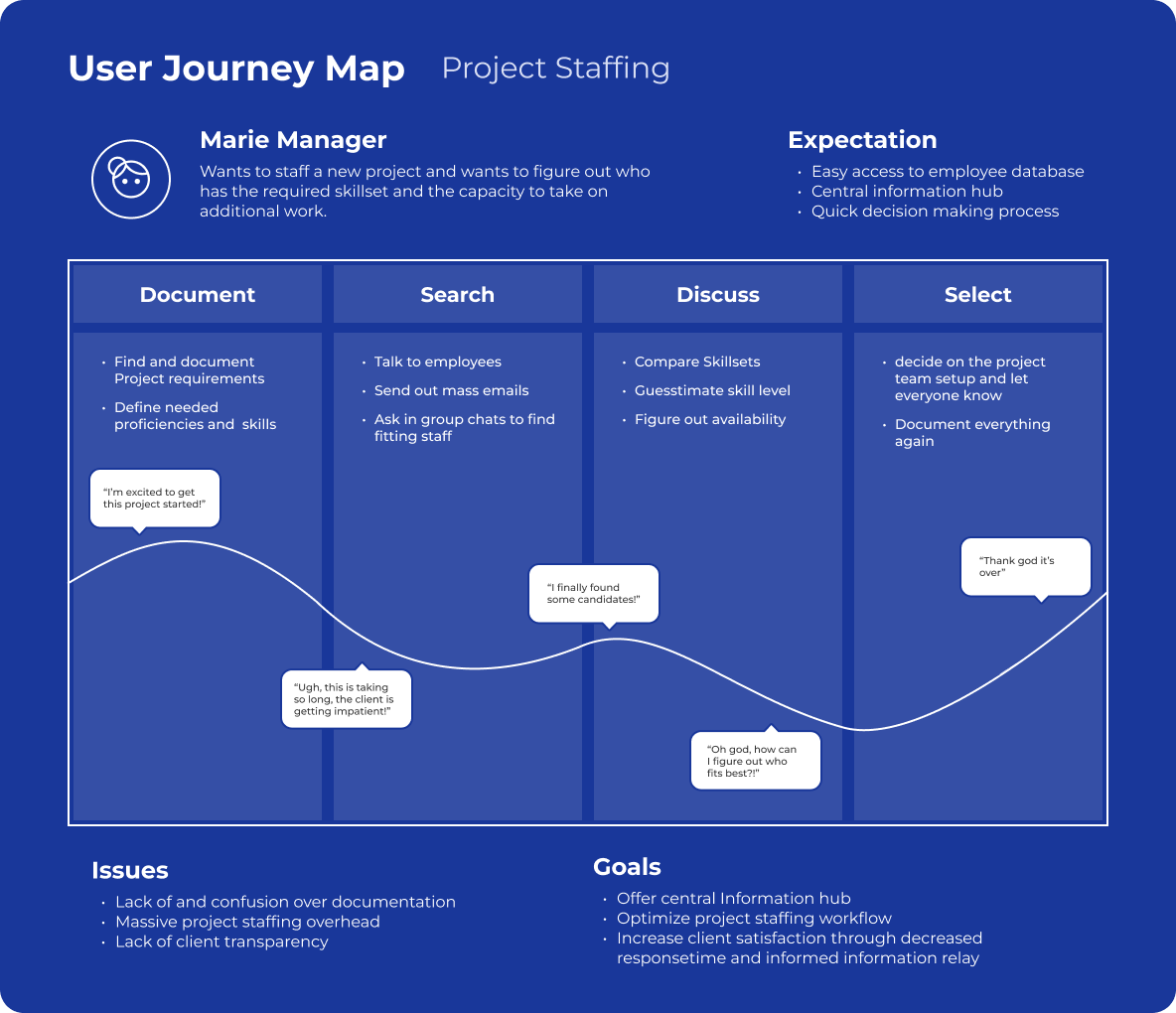
Flipping the script
Taking the user journey for project staffing and flipping the order in which a project is created resolves a lot of uncertainty.
Three views that connect the system
Skill Explorer supports talent discovery, Peer Feedback builds credible proficiency, and Project creation adds staffing context.
.png)
.png)

The rules behind the polish
Darkmode compatibility, a clean, simple look, a color space that supports concentration, accessible contrast values.

From guided steps to one efficient pageThe bare minimum for developers
Having a dark mode ready from day one was a foregone conclusion considering the target audience.
Testing the riskiest assumptions first
I had 5 participants (3 PMs, 2 Engineers) test the prototype by giving them 3 tasks each to complete and having them fill out a questionnaire afterwards.
What I'd carry into the next Project
While no real data exists for a post-launch review, the feedback after the demo showcase was overwhelmingly positive. The project reinforced that testing, accessibility, and content design all need to shape the system
Want to see more case studies?
JWT Ticket Portal
Taking support ticket creation from manual to digital
.svg)
Alpaca Operator
Modernizing a near-20 year old SAP System Manager
Caparol App
Optimizing UX by reducing navigation redundancy

User Centered
Every product decision is made to inform, support and enable users. This is what ultimately generates revenue.

Structured
I make sure that interactions feel natural and visual hierarchy is clear. I test my ideas and base decisions in data.

Accessible
The products I create are designed with accessibility in mind. This also means my solutions are robust and scalable.
.svg)