

Taking support ticket creation from manual to digital
TL;DR
I designed a lean, accessible ticket portal that digitized support ticket creation and enabled JWT clients to manage their dispensers more efficiently.
.png)
No digital overview made dispenser maintenance difficult
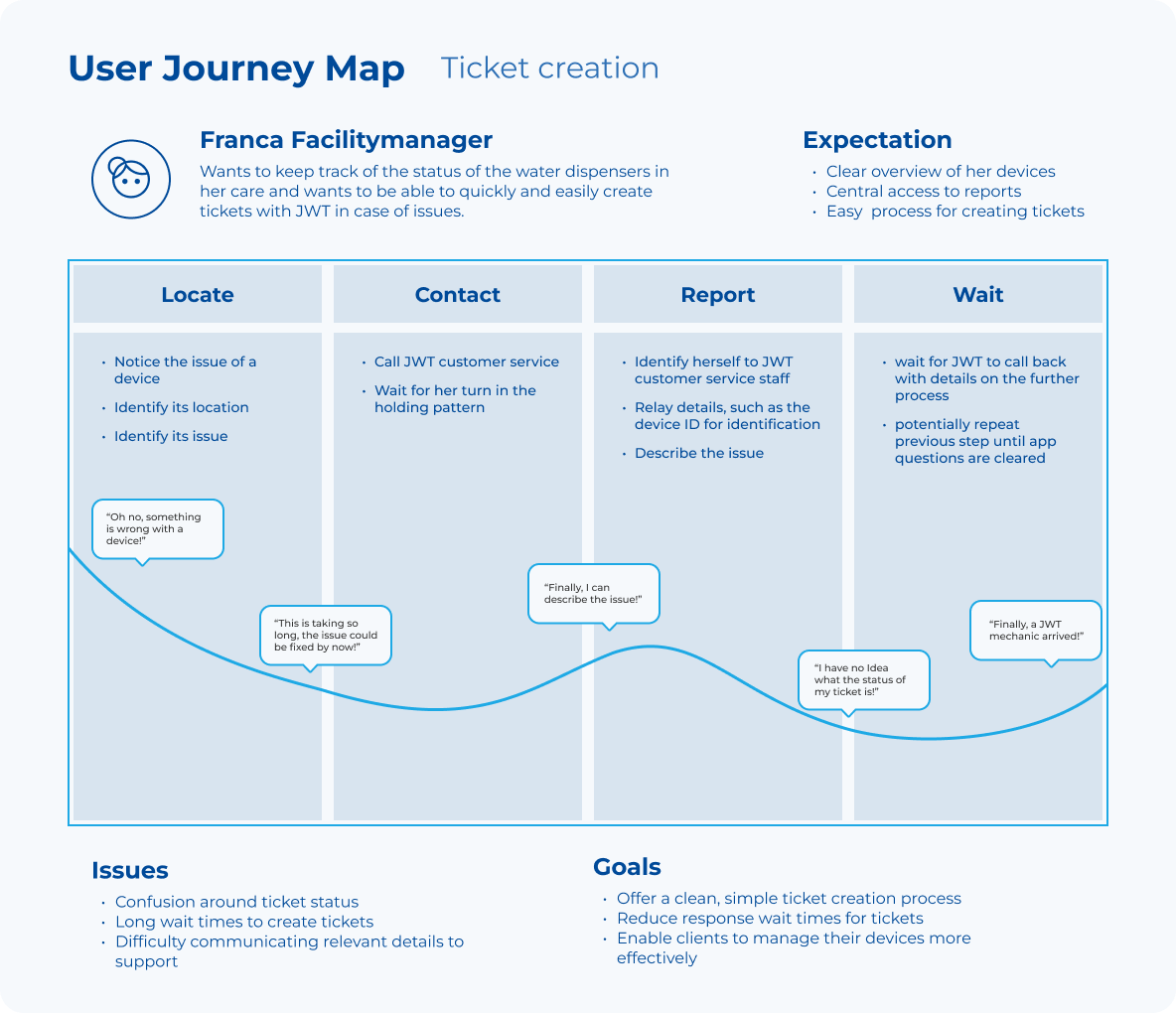
A phone-first support model overwhelmed JWT staff and delayed help for clients. With no way to digitally manage devices and their location, it was difficult for building managers to locate problem devices and initiate maintenance.
Make requesting help feel obvious
Create a focused digital path that reduces support overhead and decreases building management complexity.
A lean portal for a high-friction service moment
The work covered research, product strategy, interaction design, UI, testing, and accessible handoff.
"The portal had to feel simpler than making a phone call, not like another system to learn."
Operational expertise met questionnaire evidence
Workshops with Nadège Jakob and client questionnaires shaped the scope, form model, and navigation.
Every path leads to Rome Ticket creation
Ticket creation is reachable from every page in two to four clicks, with direct entry points across the portal.
Three moments that make self-service work
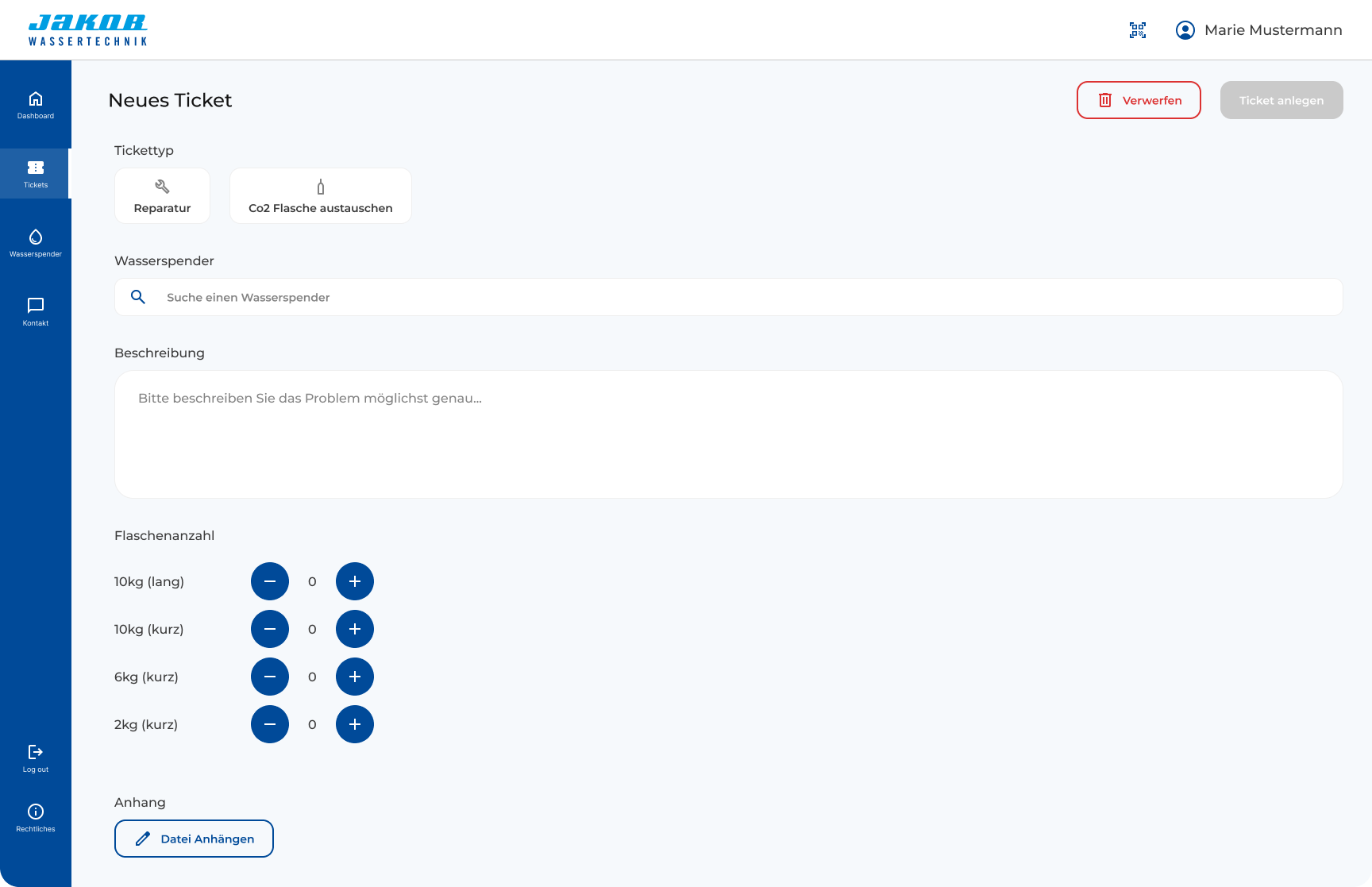
The dashboard orients clients, the ticket list keeps status visible, and the creation form reduces errors.
.png)
.png)
Clarity became a product requirement
Large type and controls, AA contrast, plain language, clear states, and documented behavior supported confident use and implementation.

From guided steps to one efficient page
The initial multi-step concept for creating tickets supported novice users, but repeated use across 35 to 200+ dispensers made speed the stronger need.
Guide users through one decision at a time
Clear, but too slow for frequent ticket creation.
Show only the most essential fields
Faster repeated use with fewer transitions and clear validation.
Measure the behavior that matters
I evaluated task speed and support-channel shift, then compared results with the original success criteria.
Accessibility carried through implementation
Detailed handoff documentation helped engineering meet WCAG 2.2 AA and EAA requirements without a later compliance retrofit.

What changed
Switching from step-by-step to a one-stop-shop ticket creation flow increased confidence, made ticket creation faster and enabled testers to put through more tickets in a given timeframe.
Ticket creation landed close to the five-minute goal
The testing average was 5.2 minutes, so slightly above target and a clear baseline for the next iteration.
What I'd carry into the next Project
The strongest decisions came from connecting executive context, user evidence, and implementation realities early.
Want to see more case studies?
Alpaca Operator
Pulling a near-20 year old SAP System Manager into 2026.
.svg)
Caparol App
Optimizing UX by reducing navigation redundancy.
StackTrack
Turning fragmented data into skill visibility.

User Centered
Every product decision is made to inform, support and enable users. This is what ultimately generates revenue.

Structured
I make sure that interactions feel natural and visual hierarchy is clear. I test my ideas and base decisions in data.

Accessible
The products I create are designed with accessibility in mind. This also means my solutions are robust and scalable.
.svg)